Nested loop

If a loop exists inside the body of another loop, it’s called a nested loop. Here’s an example of the nested for loop.

Nested loop means a loop statement inside another loop statement. That is why nested loops are also called as “loop inside loop“. Syntax for Nested For loop: for ( initialization; condition; increment ) { for ( initialization; condition; increment ) { // statement of inside loop } // statement of outer loop }

What is the use of nested loop?

Image result for java nested loop

The inner loop is nested inside the outer loop. Nested loops are useful when for each pass through the outer loop, you need to repeat some action on the data in the outer loop. For example, you read a file line by line and for each line you must count how many times the word “the” is found.

If a loop exists inside the body of another loop, it’s called a nested loop. Here’s an example of the nested for loop. // outer loop for (int i = 1; i <= 5; ++i) { // codes // inner loop for(int j = 1; j <=2; ++j) { // codes } .. } Here, we are using a for loop inside another for loop.

Example,

// outer loop
for (int i = 1; i <= 5; ++i) {
  // codes

  // inner loop
  for(int j = 1; j <=2; ++j) {
    // codes
  }
..
}

Here, we are using a for loop inside another for loop.

We can use the nested loop to iterate through each day of a week for 3 weeks.

In this case, we can create a loop to iterate three times (3 weeks). And, inside the loop, we can create another loop to iterate 7 times (7 days).


Example 1: Java Nested for Loop

class Main {
  public static void main(String[] args) {

    int weeks = 3;
    int days = 7;

    // outer loop prints weeks
    for (int i = 1; i <= weeks; ++i) {
      System.out.println("Week: " + i);

      // inner loop prints days
      for (int j = 1; j <= days; ++j) {
        System.out.println("  Day: " + j);
      }
    }
  }
}

Run Code

Output

Week: 1
  Day: 1
  Day: 2
  Day: 3
    .....  ..  ....
Week: 2
  Day: 1
  Day: 2
  Day: 3
  ....  ..  ....
....  .. ....

If they are the same size, loop through and make sure the character at each index matches. If at any point we find characters that don’t match, we know it is not equal. If we loop through the entire thing without finding a difference, then the two arrays are equal.
Java Arrays

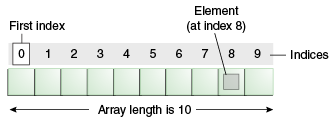
Normally, an array is a collection of similar type of elements which has contiguous memory location.

Java array is an object which contains elements of a similar data type. Additionally, The elements of an array are stored in a contiguous memory location. It is a data structure where we store similar elements. We can store only a fixed set of elements in a Java array.

Array in Java is index-based, the first element of the array is stored at the 0th index, 2nd element is stored on 1st index and so on.

Unlike C/C++, we can get the length of the array using the length member. In C/C++, we need to use the sizeof operator.

Advantages

  • Code Optimization: It makes the code optimized, we can retrieve or sort the data efficiently.
  • Random access: We can get any data located at an index position.

Disadvantages

  • Size Limit: We can store only the fixed size of elements in the array. It doesn’t grow its size at runtime. To solve this problem, collection framework is used in Java which grows automatically.

For-each Loop for Java Array

We can also print the Java array using for each loop. The Java for-each loop prints the array elements one by one. It holds an array element in a variable, then executes the body of the loop.

The syntax of the for-each loop is given below:

  1. for(data_type variable:array){  
  2. //body of the loop  
  3.  

Let us see the example of print the elements of Java array using the for-each loop.

  1. //Java Program to print the array elements using for-each loop  
  2. class Testarray1{  
  3. public static void main(String args[]){  
  4. int arr[]={33,3,4,5};  
  5. //printing array using for-each loop  
  6. for(int i:arr)  
  7. System.out.println(i);  
  8. }}  

Output: 3

An array is a container object that holds a fixed number of values of a single type. The length of an array is established when the array is created. After creation, its length is fixed.

JAVA LOOPING

Looping Statement

In Java, there are three kinds of loops which are – the for loop, the while loop, and the do-while loop. All these three loop constructs of Java executes a set of repeated statements as long as a specified condition remains true. This particular condition is generally known as loop control.

Java for Loop vs while Loop vs do-while Loop

Comparisonfor loopwhile loopdo-while loop
IntroductionThe Java for loop is a control flow statement that iterates a part of the program multiple times.The Java while loop is a control flow statement that executes a part of the programs repeatedly on the basis of given boolean condition.The Java do while loop is a control flow statement that executes a part of the programs at least once and the further execution depends upon the given boolean condition.
When to useIf the number of iteration is fixed, it is recommended to use for loop.If the number of iteration is not fixed, it is recommended to use while loop.If the number of iteration is not fixed and you must have to execute the loop at least once, it is recommended to use the do-while loop.
Syntaxfor(init;condition;incr/decr){
// code to be executed
}
while(condition){
//code to be executed
}
do{
//code to be executed
}while(condition);
Example//for loop
for(int i=1;i<=10;i++){
System.out.println(i);
}
//while loop
int i=1;
while(i<=10){
System.out.println(i);
i++;
}
//do-while loop
int i=1;
do{
System.out.println(i);
i++;
}while(i<=10);
Syntax for infinitive loopfor(;;){
//code to be executed
}
while(true){
//code to be executed
}
do{
//code to be executed
}while(true);

while loop

Java while loop is a control flow statement that allows code to be executed repeatedly based on a given Boolean condition. The while loop can be thought of as a repeating if statement. While loop in Java comes into use when we need to repeatedly execute a block of statements.

Example,

Syntax:

while (test_expression)
{
   // statements
 
  update_expression;
}
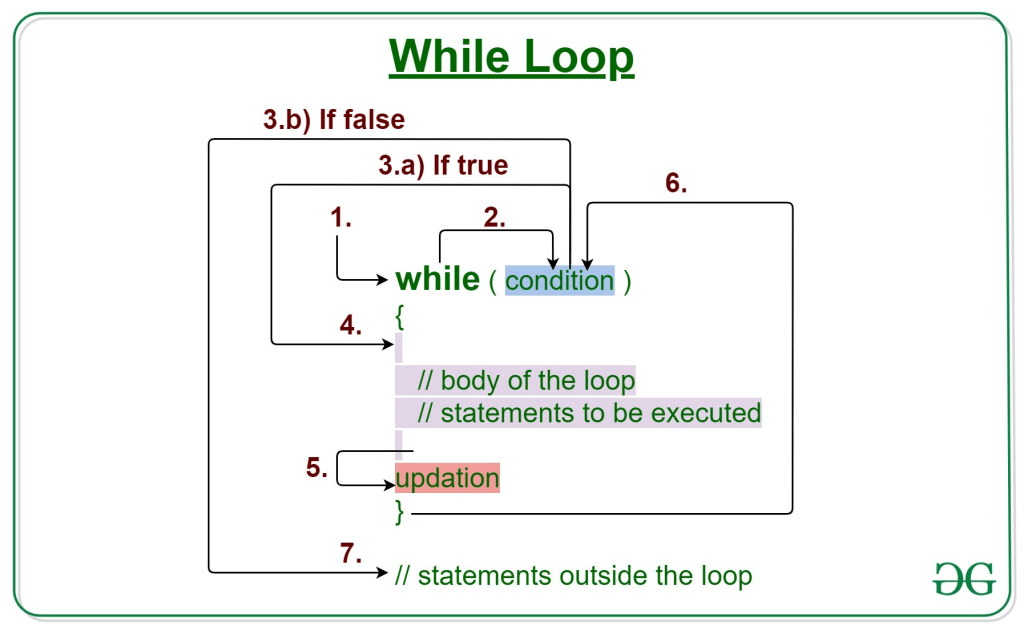
The various parts of the While loop are: 

1. Test Expression: In this expression, we have to test the condition. If the condition evaluates to true then we will execute the body of the loop and go to update expression. Otherwise, we will exit from the while loop. 

Example: 

i <= 10
2. Update Expression: After executing the loop body, this expression increments/decrements the loop variable by some value. 

Example: 

i++;
How Does a While loop execute? 

Control falls into the while loop.
The flow jumps to Condition
Condition is tested. 
If Condition yields true, the flow goes into the Body.
If Condition yields false, the flow goes outside the loop
The statements inside the body of the loop get executed.
Updation takes place.
Control flows back to Step 2.
The while loop has ended and the flow has gone outside.

 
Example 1: This program will try to print “Hello World” 5 times. 


// Java program to illustrate while loop.
 
class whileLoopDemo {
    public static void main(String args[])
    {
        
        int i = 1;
 
        while (i < 6) {
            System.out.println("Hello World");
 
            
            i++;
        }
    }

}
Output;
Hello World
Hello World
Hello World
Hello World
Hello World

For loop

The Java for loop is a control flow statement that iterates a part of the programs multiple times. The Java while loop is a control flow statement that executes a part of the programs repeatedly on the basis of given boolean condition
for loop provides a concise way of writing the loop structure. Unlike a while loop, a for statement consumes the initialization, condition and increment/decrement in one line thereby providing a shorter, easy to debug structure of looping. 
Syntax:

for (initialization condition; testing condition; 
                              increment/decrement)
{
    statement(s)
}
Flowchart: for-loop-in-java
itialization condition: Here, we initialize the variable in use. It marks the start of a for loop. An already declared variable can be used or a variable can be declared, local to loop only.
Testing Condition: It is used for testing the exit condition for a loop. It must return a boolean value. It is also an Entry Control Loop as the condition is checked prior to the execution of the loop statements.
Statement execution: Once the condition is evaluated to true, the statements in the loop body are executed.
Increment/ Decrement: It is used for updating the variable for next iteration.
Loop termination:When the condition becomes false, the loop terminates marking the end of its life cycle.
do while: do while loop is similar to while loop with only difference that it checks for condition after executing the statements, and therefore is an example of Exit Control Loop. 
Syntax:

do
{
    statements..
}
while (condition);
Flowchart: do-while
do while loop starts with the execution of the statement(s). There is no checking of any condition for the first time.
After the execution of the statements, and update of the variable value, the condition is checked for true or false value. If it is evaluated to true, next iteration of loop starts.
When the condition becomes false, the loop terminates which marks the end of its life cycle.
It is important to note that the do-while loop will execute its statements atleast once before any condition is checked, and therefore is an example of exit control loop.
Pitfalls of Loops

Infinite loop: One of the most common mistakes while implementing any sort of looping is that it may not ever exit, that is the loop runs for infinite time. This happens when the condition fails for some reason. Examples: 

//Java program to illustrate various pitfalls.
public class LooppitfallsDemo
{
    public static void main(String[] args)
    {
 
        // infinite loop because condition is not apt
        // condition should have been i>0.
        for (int i = 5; i != 0; i -= 2)
        {
            System.out.println(i);
        }
        int x = 5;
 
        // infinite loop because update statement
        // is not provided.
        while (x == 5)
        {
            System.out.println("In the loop");
        }
    }
}

HTML

Basics of HTML

HTML is the standard markup language for Web pages.

With HTML you can create your own Website.

HTML is easy to learn – You will enjoy it!

What is HTML?

  • HTML stands for Hyper Text Markup Language
  • HTML is the standard markup language for creating Web pages
  • HTML describes the structure of a Web page
  • HTML consists of a series of elements
  • HTML elements tell the browser how to display the content
  • HTML elements label pieces of content such as “this is a heading”, “this is a paragraph”, “this is a link”, etc.

A Simple HTML Document

Example;

<!DOCTYPE html>
<html>
<head>
<title>Page Title</title>
</head>
<body>

<h1>My First Heading</h1>
<p>My first paragraph.</p>

</body>
</html>

Example explain;

Example Explained

  • The <!DOCTYPE html> declaration defines that this document is an HTML5 document
  • The <html> element is the root element of an HTML page
  • The <head> element contains meta information about the HTML page
  • The <title> element specifies a title for the HTML page (which is shown in the browser’s title bar or in the page’s tab)
  • The <body> element defines the document’s body, and is a container for all the visible contents, such as headings, paragraphs, images, hyperlinks, tables, lists, etc.
  • The <h1> element defines a large heading
  • The <p> element defines a paragraph

What is an HTML Element?

An HTML element is defined by a start tag, some content, and an end tag:

<tagname> Content goes here… </tagname>

The HTML element is everything from the start tag to the end tag:

<h1>My First Heading</h1>

<p>My first paragraph.</p>

Start tagElement contentEnd tag
<h1>My First Heading</h1>
<p>My first paragraph.</p>
<br>nonenone

HTML Page Structure

<html>

<head>

<title>Page title</title>

</head>

<body>

<h1>This is a heading</h1>

<p>This is a paragraph.</p>

<p>This is another paragraph.</p>

</body></html>

HTML Basic Examples

All HTML documents must start with a document type declaration: <!DOCTYPE html>.

The HTML document itself begins with <html> and ends with </html>.

The visible part of the HTML document is between <body> and </body>

Example

<!DOCTYPE html>
<html>
<body>

<h1>My First Heading</h1>
<p>My first paragraph.</p>

</body>
</html>

The <!DOCTYPE> Declaration

The <!DOCTYPE> declaration represents the document type, and helps browsers to display web pages correctly.

It must only appear once, at the top of the page (before any HTML tags).

The <!DOCTYPE> declaration is not case sensitive.

The <!DOCTYPE> declaration for HTML5 is:

<!DOCTYPE html>

HTML Headings

HTML headings are defined with the <h1> to <h6> tags.

<h1> defines the most important heading. <h6> defines the least important heading: 

Example

<h1>This is heading 1</h1>
<h2>This is heading 2</h2>
<h3>This is heading 3</h3>

HTML Paragraphs

HTML paragraphs are defined with the <p> tag:

Example

<p>This is a paragraph.</p>
<p>This is another paragraph.</p>

HTML Links

HTML links are defined with the <a> tag:

Example

<a href=”https://https://wordpress.com/post/suganthan.data.blog/61″>This is a link</a>

The link’s destination is specified in the href attribute. 

Attributes are used to provide additional information about HTML elements.

You will learn more about attributes in a later chapter.

HTML Images

HTML images are defined with the <img> tag.

The source file (src), alternative text (alt), width, and height are provided as attributes:

Example

<img src=”image.jpg” alt=”image.com” >

JAVA

OOPS concept…

Class

Class is a blue print of object .

class create n number of object.

To create a class, use the keyword class.

classification of object.

A class — in the context of Java — is a template used to create objects and to define object data types and methods. Classes are categories, and objects are items within each category. All class objects should have the basic class properties.

Class is group of objects that share common properties and behaviour,class body is surrounded by braces{},collection of object is a class.

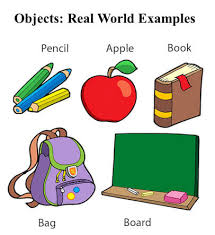
Object

Object is called instance of class,and real world entity.

object cant execute without class.

Each object has an identity, a behavior and a state

Everything in Java is associated with classes and objects, along with its attributes and methods. For example: in real life, a car is an object. The car has attributes, such as weight and color, and methods, such as drive and brake.

Example;

Inheritance

Acquiring the properties of one class to another class.

Example:parent class to child class,property(state&behaviour)

To inherit the program to parent class child class.

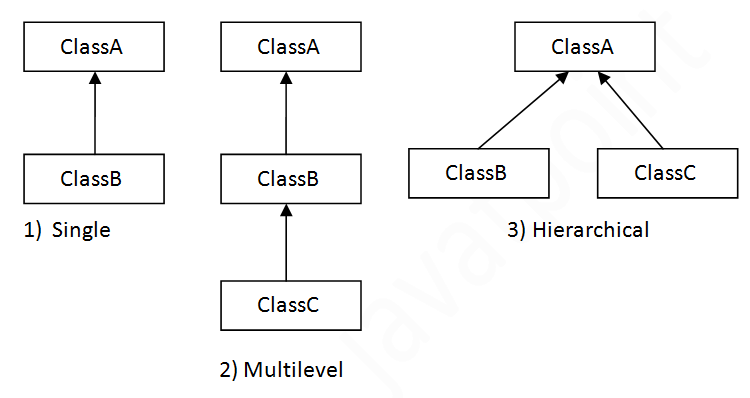
There are different types of inheritance viz., Single inheritance, Multiple inheritance, Multilevel inheritance, hybrid inheritance, and hierarchical inheritance.

Single Inheritance: When a derived class inherits only from one base class, it is known as single inheritance.

Multilevel Inheritance:When a class extends a class, which extends anther class then this is called multilevel inheritance. For example class C extends class B and class B extends class A then this type of inheritance is known as multilevel inheritance.

Hierarchical Inheritance:The type of inheritance in which more than one derived class inherits the properties of the same base class is called hierarchical inheritance. There are multiple child classes and a single parent class.

Hybrid Inheritance:Class A as Animal Class, Class B as Mammals, Class C as Herbivores, Class D as Cow. Mammals can be derived from Animal class, and Cow is a combination of Herbivores and Mammals. This relationship well defines the combination of Multiple Inheritance and Single Inheritance.

Example;

Abstraction

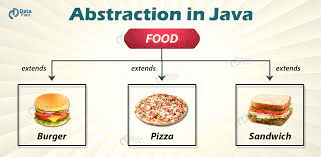
Abstraction is a process of hiding the implementation details showing only Funcyionality to users.

In java, abstraction is achieved by interfaces and abstract classes. We can achieve 100% abstraction using interfaces. Abstract classes and Abstract methods : An abstract class is a class that is declared with an abstract keyword. An abstract method is a method that is declared without implementation.

The main purpose of abstraction is hiding the unnecessary details from the users. Abstraction is selecting data from a larger pool to show only relevant details of the object to the user. It helps in reducing programming complexity and efforts.

Example;

Polymorphism

Polymorphism means “many forms”, and it occurs when we have many classes that are related to each other by inheritance it show only in runtime not show in complie time.

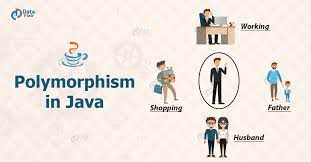
Polymorphism in java is a concept by which we can perform a single action in different ways. Example ;one actor act in different form

In Java, polymorphism refers to the ability of a class to provide different implementations of a method, depending on the type of object that is passed to the method. To put it simply, polymorphism in Java allows us to perform the same action in many different ways…

Example;

Encapsulation

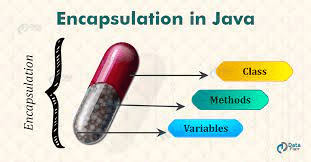
Encapsulation in Java is the process by which data (variables) and the code that acts upon them (methods) are integrated as a single unit. By encapsulating a class’s variables, other classes cannot access them, and only the methods of the class can access them.

A class is a program-code-template that allows developers to create an object that has both variables (data) and behaviors (functions or methods). A class is an example of encapsulation in computer science in that it consists of data and methods that have been bundled into a single unit.

Example;

Design a site like this with WordPress.com
Get started