Array practice 3

package suganthan;

public class Arrayprac3 {

void linear_search(int a[])
{
int linear=3;
int a1=0;
for(int i=0;i<a.length;i++)
{
if(a[i]==linear)
{
a1=a[i];
}
}
if(a1==linear)
{
System.out.println(“its linear”);
}
else
{
System.out.println(“not linear”);
}

}
void ele(int a[])
{
int pre=2;
int count=0;
for(int i=0;i<a.length;i++)
{
if(a[i]==pre)
{
count++;
}
}
System.out.println(“how many times give element is present is” +count);
}
void finding_index(int a[])
{
int index=4;
int a2=0;
for(int i=0;i<a.length;i++)
{
if(a[i]==index)
{
a2=i;

}
}
System.out.println(“Index of given number is”+ a2);
}
void removing_index(int a[])
{
int index=4;
for(int i=0;i<a.length;i++)
{
if(a[i]==index)
{
continue;
}
System.out.println(a[i]);
}
}
void placing_index(int a[])
{
int index=6;
int pos=a.length;
for(int i=0;i<=a.length-1;i++)
{
if(a[i]==pos)
{
System.out.println(index);
}
System.out.println(a[i]);
}
}
void duplicate_count(int a[])
{
int index=2;
int count=0;
for(int i=0;i<=a.length-1;i++)
{
if(a[i]==index)
{
count++;
}
}
System.out.println(count);

}

public static void main(String[] args) {
Arrayprac3 a2=new Arrayprac3();
        int a[]= {1,2,3,4,5};
        a2.linear_search(a);
        int a1[]= {10,2,3,2,2,2,28};
        a2.ele(a1);
        int a3[]= {2,3,5,4,6,7};
        a2.finding_index(a3);
        int a4[]= {2,3,5,4,6,7};
        a2.removing_index(a4);

        int a5[]= {1,2,3,4,5};
        a2.placing_index(a5);
        int a6[]= {1,2,2,2,2,3,4,5,2};
        a2.duplicate_count(a6);

}

}

output;

its linear


how many times give element is present is4


Index of given number is3

removing index
2
3
5
6
7

adding last index
1
2
3
4
6
5

duplicate number array

5
Array practice

package suganthan;

public class Arrayprac2 {
void add() //array declaration
{
int[] arr=new int[5];
arr[0]=11;
arr[1]=12;
arr[2]=13;
arr[3]=14;
arr[4]=15;
for(int i=0;i<arr.length;i++)
{
System.out.println(arr[i]);
}
}

void add1()//Array initialization
{
int a[]= {10,20,30,40,50};
for(int i=0;i<a.length;i++)
{
System.out.println(a[i]);
}
}
void add2()//Array printing reverse
{
int a[]= {10,20,30,40,50};
for(int i=a.length-1;i>=0;i–)
{
System.out.println(a[i]);
}
}
void add3()// printing only even index
{
int a[]= {2,3,4,5,6,7,8};
for(int i=0;i<a.length;i++)
{

if(a[i]%2==0)
{
System.out.println(a[i]);
}

}
}
void add4()// printing only odd index
{
int a[]= {2,3,4,5,6,7,8};
for(int i=0;i<a.length;i++)
{

if(a[i]%2!=0)
{
System.out.println(a[i]);
}

}
}
void add5()// Finding total and percentage of the mark
{
int a[]= {10,20,30,40,50};
int per=0;
for(int i=0;i<a.length;i++)
{

per=per+a[i];

}
System.out.println(per/a.length);
}

void add6()// Finding highest value of given  array
{
int a[]= {10,70,90,20,50};
int highest=a[0];
for(int i=0;i<a.length;i++)
{

if(a[i]>highest)
{
highest=a[i];
}

}
System.out.println(highest);
}
void add7()// Finding lowest value of given  array
{
int a[]= {70,90,20,10,50};
int lowest=a[0];
for(int i=0;i<a.length;i++)
{

if(a[i]<lowest)
{
lowest=a[i];
}

}
System.out.println(lowest);
}

public static void main(String[] args) {
// TODO Auto-generated method stub

Arrayprac2 a1=new Arrayprac2();
a1.add();
a1.add1();
   a1.add2();
a1.add3();
a1.add4();
   a1.add5();
   a1.add6();
a1.add7();

}

}

output;

array declaration

11

1213
14

15

Array initialization10
20
30
40

50

Array reverse
50
40
30
20

10

printing even array
2
4
6

8

printing odd array
3
5

7

Finding total and percentage of the mark

30

Finding highest value of given  array

90

Finding lowest value of given  array

10

Polymorphism

Polymorphism means “many forms”, and it occurs when we have many classes that are related to each other by inheritance.

Like we specified in the previous chapter; Inheritance lets us inherit attributes and methods from another class. Polymorphism uses those methods to perform different tasks. This allows us to perform a single action in different ways.

For example, think of a superclass called Animal that has a method called animalSound(). Subclasses of Animals could be Pigs, Cats, Dogs, Birds – And they also have their own implementation of an animal sound (the pig oinks, and the cat meows, etc.):

Polymorphism in Java makes it possible to write a method that can correctly process lots of different types of functionalities that have the same name. We can also gain consistency in our code by using polymorphism.

Polymorphism means “many forms”, and it occurs when we have many classes that are related to each other by inheritance. Like we specified in the previous chapter; Inheritance lets us inherit attributes and methods from another class. Polymorphism uses those methods to perform different tasks.

Example

class Animal {
  public void animalSound() {
    System.out.println("The animal makes a sound");
  }
}

class Pig extends Animal {
  public void animalSound() {
    System.out.println("The pig says: wee wee");
  }
}

class Dog extends Animal {
  public void animalSound() {
    System.out.println("The dog says: bow wow");
  }
}

Reference;

https://www.w3schools.com/java/java_polymorphism.asp

https://www.geeksforgeeks.org/polymorphism-in-java/

java.lang.object

The java.lang.Object class is the root of the class hierarchy. Every class has Object as a superclass. All objects, including arrays, implement the methods of this class.

Class Object is the root of the class hierarchy.

Every class has Object as a superclass.

All objects, including arrays, implement the methods of this class.

The Object class provides multiple methods which are as follows:

  • tostring() method.
  • hashCode() method.
  • equals(Object obj) method.
  • finalize() method.
  • getClass() method.
  • clone() method.
  • wait()
  • notify()
  • notifyAll() methods.

tostring( ) Method:

returns the string representation of this object.

The toString( ) provides a String representation of an object and is used to convert an object to a String.

Whenever we try to print any Object reference, then internally toString( ) method is called.

The default toString( ) method for class Object returns a string consisting of the name of the class of which the object is an instance, the at-sign character `@’, and the unsigned hexadecimal representation of the hash code of the object.

hashCode( ) Method:

returns the hashcode number for this object.

Override of hashCode() method needs to be done such that for every object we generate a unique number.

The hashCode() method is native because in Java it is impossible to find the address of an object, so it uses native languages like C/C++ to find the address of the object.

equals(Object ob) method:

  • It compares the given object to “this” object (the object on which the method is called). 
  •  It gives a generic way to compare objects for equality.
  • It is recommended to override the equals(Object obj) method to get our own equality condition on Objects.
  • It is generally necessary to override the hashCode() method whenever this method is overridden, so as to maintain the general contract for the hashCode method, which states that equal objects must have equal hash codes. 

Methods of Object class:

The Object class provides many methods. They are as follows:
MethodDescription
public final Class getClass()returns the Class class object of this object. The Class class can further be used to get the metadata of this class.
public int hashCode()returns the hashcode number for this object.
public boolean equals(Object obj)compares the given object to this object.
protected Object clone() throws CloneNotSupportedExceptioncreates and returns the exact copy (clone) of this object.
public String toString()returns the string representation of this object.
public final void notify()wakes up single thread, waiting on this object’s monitor.
public final void notifyAll()wakes up all the threads, waiting on this object’s monitor.
public final void wait(long timeout)throws InterruptedExceptioncauses the current thread to wait for the specified milliseconds, until another thread notifies (invokes notify() or notifyAll() method).
public final void wait(long timeout,int nanos)throws InterruptedExceptioncauses the current thread to wait for the specified milliseconds and nanoseconds, until another thread notifies (invokes notify() or notifyAll() method).
public final void wait()throws InterruptedExceptioncauses the current thread to wait, until another thread notifies (invokes notify() or notifyAll() method).
protected void finalize()throws Throwableis invoked by the garbage collector before object is being garbage collected.

Reference :

1.https://docs.oracle.com/javase/7/docs/api/java/lang/Object.html
2.https://www.geeksforgeeks.org/object-class-in-java/
3.https://www.javatpoint.com/object-class

Advertisements

Pattern Practice 3

package suganthan;

public class Patternpract {
void add()
{
System.out.println( ” “);
for(int row=1;row<=7;row++)
{

for(int col=1;col<=7;col++)
{
if(( row==1) || (row==4) || (row==7) || ((col==1)&&(row<5)) || ((col==7)&&(row>4)))
{  
System.out.print(“S “);
}
else
{
System.out.print(”  “);
}

}

System.out.println();
}
}
void add2()
{
System.out.println( ” “);
for(int row=1;row<=7;row++)
{

for(int col=1;col<=7;col++)
{
if(row==1 || row==7 || col==1 || ((col==7 && row>=4)) ||((row==4 && col>=4)))
{  
System.out.print(“G “);
}
else
{
System.out.print(”  “);
}

}

System.out.println();
}
}
void add1()
{
System.out.println( ” “);
for(int row=1;row<=7;row++)
{

for(int col=1;col<=7;col++)
{
if( row==7 || col==1 || col==7 )
{
System.out.print(“U “);
}
else
{
System.out.print(”  “);
}

}

System.out.println();
}
}

void add3()
{
System.out.println( ” “);
for(int row=1;row<=7;row++)
{

for(int col=1;col<=7;col++)
{
if( row==1 || row==4 || col==1 || col==4 )
{  
System.out.print(“A “);
}
else
{
System.out.print(”     “);
}

}

System.out.println();
}
}
void add4()
{
System.out.println( ” “);
for(int row=1;row<=7;row++)
{

for(int col=1;col<=7;col++)
{
if( row==col || col==1 || col==7 )
{
System.out.print(“N “);
}
else
{
System.out.print(”  “);
}

}

System.out.println();
}
}
void add5()
{
System.out.println( ” “);
for(int row=1;row<=7;row++)
{

for(int col=1;col<=7;col++)
{
if( row==1 || col==4 )
{
System.out.print(“T “);
}
else
{
System.out.print(”  “);
}

}

System.out.println();
}
}
void add6()
{
System.out.println( ” “);
for(int row=1;row<=7;row++)
{

for(int col=1;col<=7;col++)
{
if( row==4 || col==1 || col==7 )
{  
System.out.print(“H “);
}
else
{
System.out.print(”  “);
}

}

System.out.println();
}
}

void add7()
{
System.out.println( ” “);
for(int row=1;row<=7;row++)
{

for(int col=1;col<=7;col++)
{
if( row==1 || row==4 || col==1 || col==4 )
{  
System.out.print(“A “);
}
else
{
System.out.print(”     “);
}

}

System.out.println();
}
}

void add8()
{
System.out.println( ” “);
for(int row=1;row<=7;row++)
{

for(int col=1;col<=7;col++)
{
if( row==col || col==1 || col==7 )
{
System.out.print(“N “);
}
else
{
System.out.print(”  “);
}

}

System.out.println();
}
}
public static void main(String args[])
{

   Patternpract p=new Patternpract();
   p.add();
Patternpract p1=new Patternpract();
p1.add1();
Patternpract p2=new Patternpract();
p2.add2();
Patternpract p3=new Patternpract();
p3.add3();

Patternpract p4=new Patternpract();
p4.add4();
Patternpract p5=new Patternpract();
p5.add5();
Patternpract p6=new Patternpract();
p6.add6();
Patternpract p7=new Patternpract();
p7.add7();
Patternpract p8=new Patternpract();
   p8.add8();

}
}

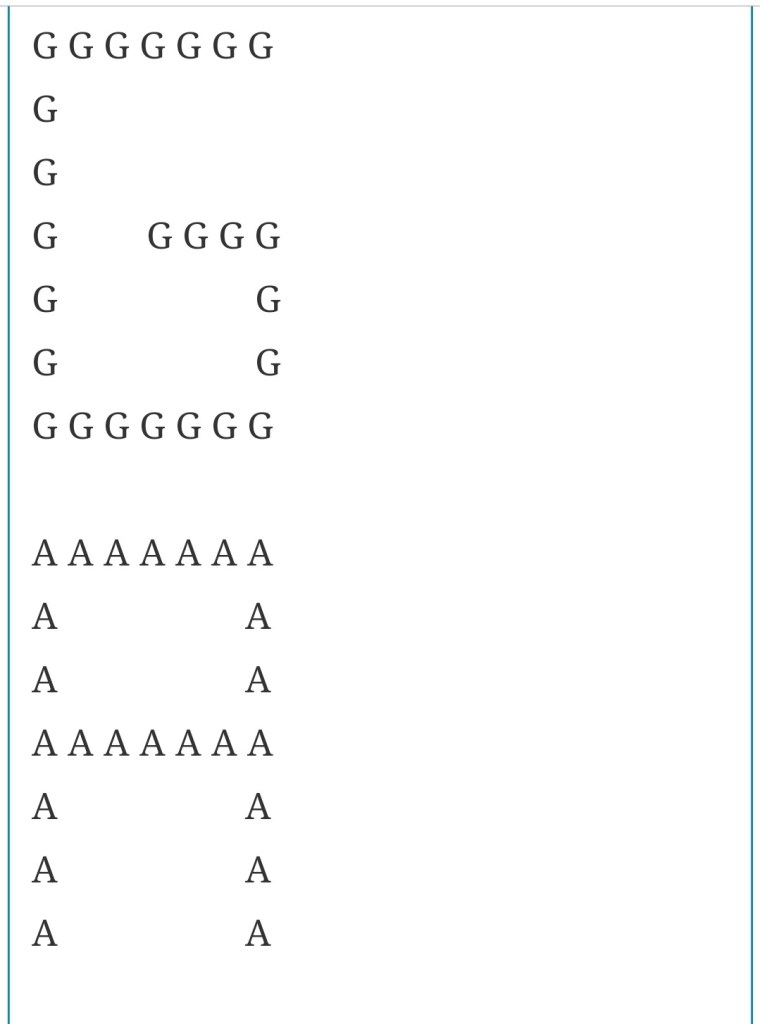
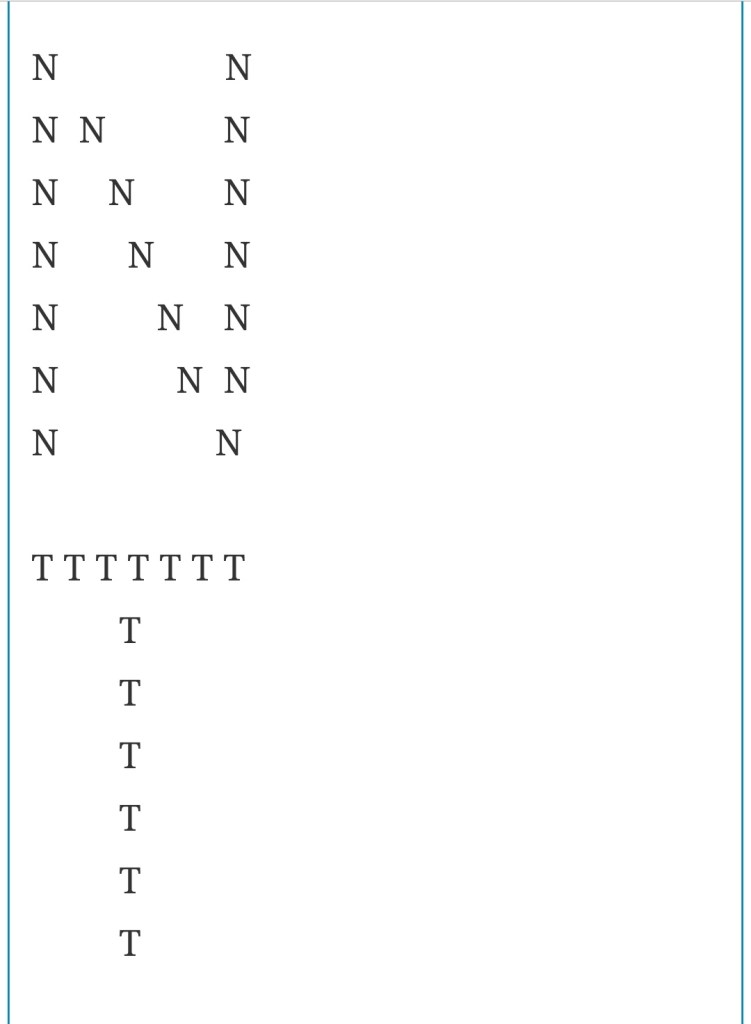
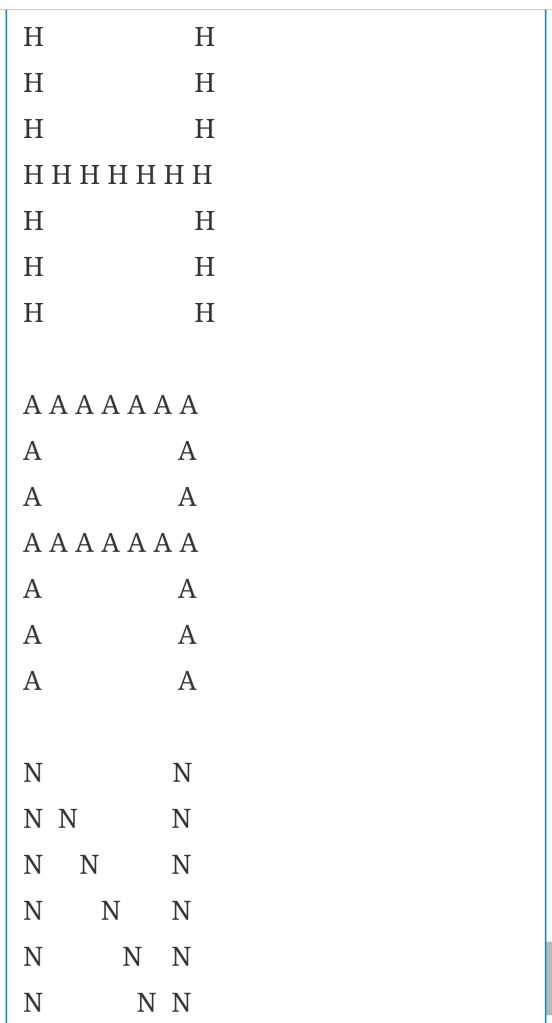
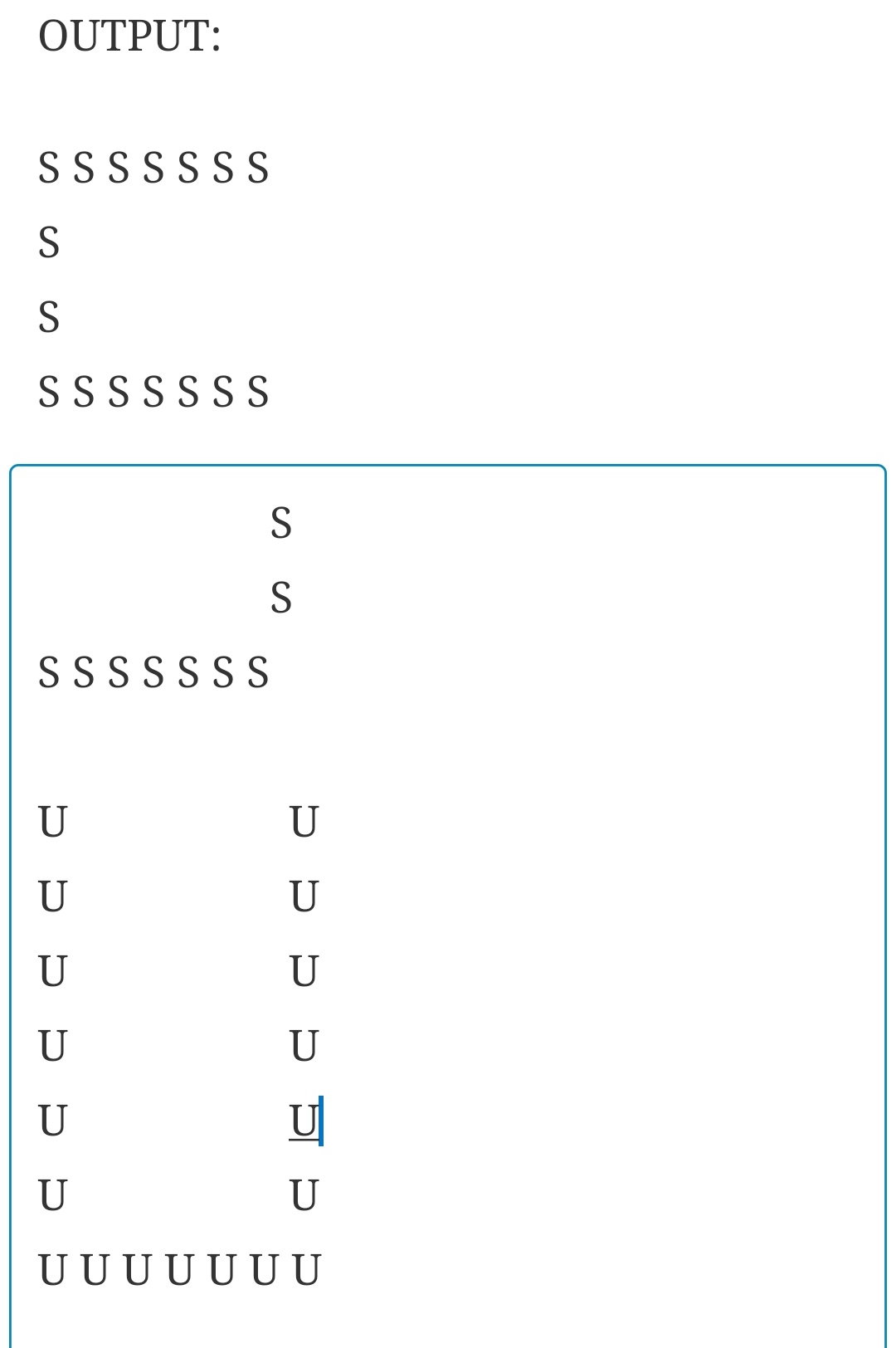
OUTPUT:

Pattern practice 2:

public class Pattern1 {
void add() {
for(int row=5;row>=1;row–)
{
for(int col=1;col<=row;col++)
{
System.out.print(row+” “);

    }    
System.out.println();
}
}
public static void main(String[] args)
{  
  Pattern1 p1=new Pattern1(); 
   p1.add();
}

}

OUTPUT:

5 5 5 5 5
4 4 4 4
3 3 3
2 2
1

Pattern 2:

public class Pattern2 {
void add1() {
for(int row=1;row<=5;row++)
{
for(int col=1;col<=row;col++)
{
System.out.print(col+” “);

    }   
 System.out.println();
}
}public static void main(String[] args)
{    
Pattern2 p2=new Pattern2();
    p2.add1();
}

}

OUTPUT:

1
1 2
1 2 3
1 2 3 4
1 2 3 4 5

Pattern 3:

public class Pattern3 {
void add2() {
for(int row=5;row>=1;row–)
{
for(int col=5;col>=row;col–)
{
System.out.print(row+” “);

    }    
System.out.println();
}
}public static void main(String[] args)
{  
  Pattern3 p3=new Pattern3(); 
   p3.add2();
}

}

OUTPUT:

5
4 4
3 3 3
2 2 2 2
1 1 1 1 1

Pattern 4:

public class Pattern4 {
void add3 {
for(int row=1;row<=5;row++)
{
for(int col=row;col<=5;col++)
{
System.out.print(row+” “);

    } 
   System.out.println();
}
}
public static void main(String[] args)
{    
Pattern4 p4=new Pattern4(); 
   p4.add3();}

}

OUTPUT:

1 1 1 1 1
2 2 2 2
3 3 3
4 4
5

Pattern Programs:

1) Printing pattern
5 4 3 2 1 
5 4 3 2 
5 4 3 
5 4 
5 

public class Pattern1 {

	void add(){
       for(int row=1;row<=5;row++) {
    	   for(int col=5;col>=row;col--) {
    		   System.out.print(col+" ");
    	   }
    	   System.out.println();
       }
	}
}
public static void main(String[] args) {
Pattern2 p1=new Pattern1();
p1.add();
}
}

3)Printing pattern
1 1 1 1 1 
2 2 2 2 
3 3 3 
4 4 
5 
Program :
public class Pattern3 {
        void add()
   for(int row=1;row<=5;row++) {
	   for(int col=5;col>=row;col--) {
		   System.out.print(row+" ");
	   }
	   System.out.println();
   }
	}
}

public static void main(String[] args) {
Pattern3 p3=new Pattern3();
p3.add();

}

4) Printing pattern
5 5 5 5 5 
4 4 4 4 
3 3 3 
2 2 
1 


class Pattern4{
	 void add(){
		for(int row=5;row>=1;row--) {
			for(int col=1;col<=row;col++) {
				System.out.print(row+" ");
			}
			System.out.println();
		}
	}
}
public static void main(String[] args) {
Pattern4 p4=new Pattern4();
p4.add();
}
}

5)Printing pattern
1 
1 2 
1 2 3 
1 2 3 4 
1 2 3 4 5 

class Pattern5
{	
void add(){
		for(int row=1;row<=5;row++) {
			for(int col=1;col<=row;col++) {
				System.out.print(col+" ");
			}
			System.out.println();
		}
	}
}
public static void main(String[] args) {
Pattern5 p5=new Pattern5();
p5.add();
}
}

6) Printing pattern  
5 
5 4 
5 4 3 
5 4 3 2 
5 4 3 2 1 

Program 
public class Pattern6 {

	void add(){
  for(int row=5;row>=1;row--) {
	  for(int col=5;col>=row;col--) {
		  System.out.print(col+" ");
	  }
	  System.out.println();
  }
	}

}
public static void main(String[] args) {
Pattern5 p5=new Pattern5();
p5.add();
}
}

7)Print pattern
5 
4 4 
3 3 3 
2 2 2 2 
1 1 1 1 1 

public class Pattern7{
	void add(){
  for(int row=5;row>=1;row--) {
	  for(int col=5;col>=row;col--) {
		  System.out.print(row+" ");
	  }
	  System.out.println();
  }
	}
}
public static void main(String[] args) {
Pattern7 p7=new Pattern7();
p7.add();
}
}

Looping practice 2

NEON Number program:

public class Neonno {
void add(int num){
int square=num*num;
int sum=0;
while(square>0) {
int rem=square%10;
sum=sum+rem;
square=square/10;
}
if(num==sum) {
System.out.println(“This is NEON number”);
}
else {
System.out.println(“Not a NEON number”);
}
}
public static void main(String[] args) {
Neonno n1=new Neonno();
n.add(9);

}

OUTPUT:

This is NEON number

LEAST COMMON MULTIPLE(lcm):

public class Lcm {
void add(int n1,int n2) {
int big=n1>n2 ? n1:n2;
while(true) {
if(big%n1==0 && big%n2==0) {
System.out.println(big + ” is the least common multiple of 12,9 ”);
break;
}
big=big+1;
}
}
public static void main(String[] args) {
Lcm l1=new Lcm();
lcm.add(12,9);
}

}

OUTPUT:

36 is the least common multiple of 12,

Perfect number:

public class Prefectno {

void add(int num,int div,int sum)
{     
 while (div<num)
{       
 if (num % div == 0) {            
         
  sum = sum + div;        
}        
div = div + 1;
   
 if (num == sum)
{        
System.out.println(number+"IS A PREFECT NUMBER");   
 }
else
{     
   System.out.println("NOT PREFECT NUMBER "); 
   }
}
public static void main(String[] args)
{  
Prefectno n1=new Prefectno();
n1.add(28,1,0);
}

}

OUTPUT :

28 IS A PREFECT NUMBER

Looping practice

Smallest Divisor of a given number:

public class Smalldiv {
void add(int n) {
int div=2;
while(div<n) {
if(n%div==0) {
System.out.println(div + ” is a smallest divisor of given number”);
break;
}
div=div+1;
}
}
public static void main(String[] args) {
Smalldiv s1=new Smalldiv();
s1.add(25);
}

}

OUTPUT:

5 is a smallest divisor of given number

Square root of a given number:

public class Squareroot {
void add(int n) {
int div=2;
while(div<n) {
if (n/div==div) {
System.out.println(div + ” is a Square root of given number”);
break;
}
div=div+1;
}
}
public static void main(String[] args) {
Squareroot s1=new Squareroot();
s1.add(16);
}

}

OUTPUT:

4 is a Square root of given number

Reverse a program in a given Number:


public class Reverse {
void rever(int num) {  
 int rev=0;    
while(num>0) {        
int rem=n%10;       
 rev=(rev*10)+rem;        
num=num/10;    
}   
 System.out.println(rev);

}public static void main(String[] args) {
Reverse r1 =new Reverse();
r1.rever(1234);

}

}

OUTPUT:

4321 is a smallest divisor of given number

Armstrong Number:


public class Armstrongno {
void add(int n1) {
int armstrong=0;
int n2=n1;
while(n1>0) {
int rem=n1%10;
int power=rem*rem*rem;
armstrong=armstrong+power;
n1=n1/10;
}
if(n2==armstrong) {
System.out.println(armstrong);
}
else {
System.out.println(“Not a Armstrong”);
}
}
public static void main(String[] args) {
Armstrongno a=new Armstrongno();
a.add(153);
}

}

OUTPUT:

armstrong

Recursion in Java

Recursion is the technique of making a function call itself. This technique provides a way to break complicated problems down into simple problems which are easier to solve.

Recursion may be a bit difficult to understand. The best way to figure out how it works is to experiment with it.

A condition must be specified to stop recursion; otherwise it will lead to an infinite process.

In case of recursion, all partial solutions are combined to obtain the final solution.

Advantages:

i. The main benefit of a recursive approach to algorithm design is that it allows programmers to take advantage of the repetitive structure present in many problems.

ii. Complex case analysis and nested loops can be avoided.

iii. Recursion can lead to more readable and efficient algorithm descriptions.

iv. Recursion is also a useful way for defining objects that have a repeated similar structural form.

 Disadvantages:

i. Slowing down execution time and storing on the run-time stack more things than required in a non recursive approach are major limitations of recursion.

ii. If recursion is too deep, then there is a danger of running out of space on the stack and ultimately program crashes.

iii. Even if some recursive function repeats the computations for some parameters, the run time can be prohibitively long even for very simple cases.

Example,

public class RecursionExample {  
int count=0;  
 void add(){  
count++;  
if(count<=5){  
System.out.println("hello "+count);  
add();  
}  
}  
public static void main(String[] args) {  
add();  
}  
}  

Reference.

https://www.w3schools.com/java/tryjava.asp?

https://www.javatpoint.com/recursion-in-java

https://www.geeksforgeeks.org/recursion-in-java/

Design a site like this with WordPress.com
Get started