Looping Statement
In Java, there are three kinds of loops which are – the for loop, the while loop, and the do-while loop. All these three loop constructs of Java executes a set of repeated statements as long as a specified condition remains true. This particular condition is generally known as loop control.
Java for Loop vs while Loop vs do-while Loop
| Comparison | for loop | while loop | do-while loop |
|---|---|---|---|
| Introduction | The Java for loop is a control flow statement that iterates a part of the program multiple times. | The Java while loop is a control flow statement that executes a part of the programs repeatedly on the basis of given boolean condition. | The Java do while loop is a control flow statement that executes a part of the programs at least once and the further execution depends upon the given boolean condition. |
| When to use | If the number of iteration is fixed, it is recommended to use for loop. | If the number of iteration is not fixed, it is recommended to use while loop. | If the number of iteration is not fixed and you must have to execute the loop at least once, it is recommended to use the do-while loop. |
| Syntax | for(init;condition;incr/decr){ // code to be executed } | while(condition){ //code to be executed } | do{ //code to be executed }while(condition); |
| Example | //for loop for(int i=1;i<=10;i++){ System.out.println(i); } | //while loop int i=1; while(i<=10){ System.out.println(i); i++; } | //do-while loop int i=1; do{ System.out.println(i); i++; }while(i<=10); |
| Syntax for infinitive loop | for(;;){ //code to be executed } | while(true){ //code to be executed } | do{ //code to be executed }while(true); |
while loop
Java while loop is a control flow statement that allows code to be executed repeatedly based on a given Boolean condition. The while loop can be thought of as a repeating if statement. While loop in Java comes into use when we need to repeatedly execute a block of statements.
Example,
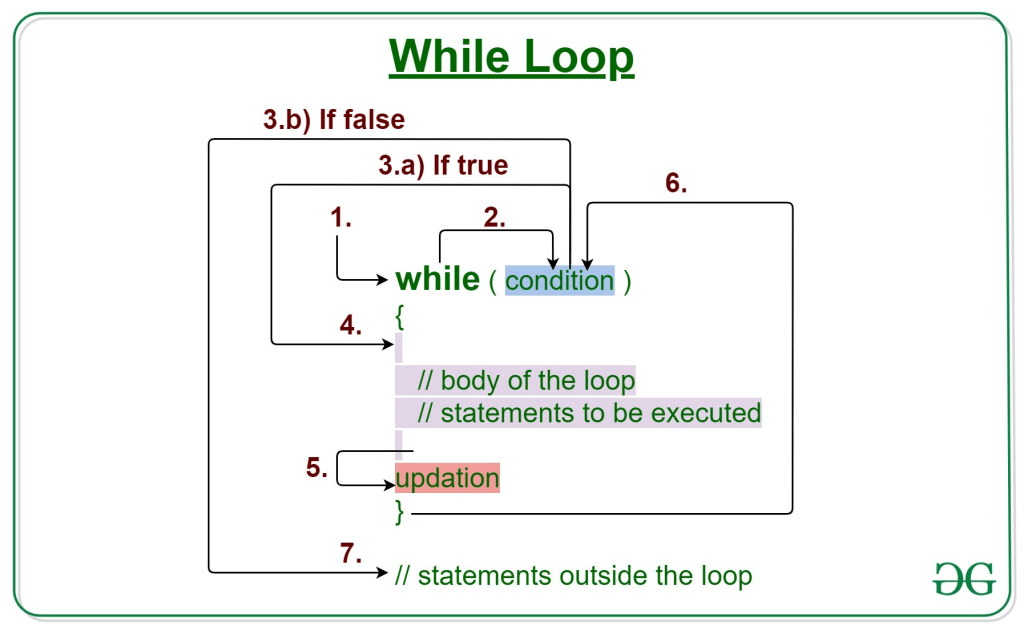
Syntax:
while (test_expression)
{
   // statements

  update_expression;
}
The various parts of the While loop are:

1. Test Expression: In this expression, we have to test the condition. If the condition evaluates to true then we will execute the body of the loop and go to update expression. Otherwise, we will exit from the while loop.

Example:

i <= 10
2. Update Expression: After executing the loop body, this expression increments/decrements the loop variable by some value.

Example:

i++;
How Does a While loop execute?

Control falls into the while loop.
The flow jumps to Condition
Condition is tested.
If Condition yields true, the flow goes into the Body.
If Condition yields false, the flow goes outside the loop
The statements inside the body of the loop get executed.
Updation takes place.
Control flows back to Step 2.
The while loop has ended and the flow has gone outside.


Example 1: This program will try to print “Hello World” 5 times.


// Java program to illustrate while loop.

class whileLoopDemo {
    public static void main(String args[])
    {

        int i = 1;

        while (i < 6) {
            System.out.println("Hello World");


            i++;
        }
    }

}
Output;
Hello World
Hello World
Hello World
Hello World
Hello World

For loop

The Java for loop is a control flow statement that iterates a part of the programs multiple times. The Java while loop is a control flow statement that executes a part of the programs repeatedly on the basis of given boolean condition
for loop provides a concise way of writing the loop structure. Unlike a while loop, a for statement consumes the initialization, condition and increment/decrement in one line thereby providing a shorter, easy to debug structure of looping.
Syntax:

for (initialization condition; testing condition;
                              increment/decrement)
{
    statement(s)
}
Flowchart: for-loop-in-java
itialization condition: Here, we initialize the variable in use. It marks the start of a for loop. An already declared variable can be used or a variable can be declared, local to loop only.
Testing Condition: It is used for testing the exit condition for a loop. It must return a boolean value. It is also an Entry Control Loop as the condition is checked prior to the execution of the loop statements.
Statement execution: Once the condition is evaluated to true, the statements in the loop body are executed.
Increment/ Decrement: It is used for updating the variable for next iteration.
Loop termination:When the condition becomes false, the loop terminates marking the end of its life cycle.
do while: do while loop is similar to while loop with only difference that it checks for condition after executing the statements, and therefore is an example of Exit Control Loop.
Syntax:

do
{
    statements..
}
while (condition);
Flowchart: do-while
do while loop starts with the execution of the statement(s). There is no checking of any condition for the first time.
After the execution of the statements, and update of the variable value, the condition is checked for true or false value. If it is evaluated to true, next iteration of loop starts.
When the condition becomes false, the loop terminates which marks the end of its life cycle.
It is important to note that the do-while loop will execute its statements atleast once before any condition is checked, and therefore is an example of exit control loop.
Pitfalls of Loops

Infinite loop: One of the most common mistakes while implementing any sort of looping is that it may not ever exit, that is the loop runs for infinite time. This happens when the condition fails for some reason. Examples:

//Java program to illustrate various pitfalls.
public class LooppitfallsDemo
{
    public static void main(String[] args)
    {

        // infinite loop because condition is not apt
        // condition should have been i>0.
        for (int i = 5; i != 0; i -= 2)
        {
            System.out.println(i);
        }
        int x = 5;

        // infinite loop because update statement
        // is not provided.
        while (x == 5)
        {
            System.out.println("In the loop");
        }
    }
}
 Site Title